Claude Code Permissions and Hooks: Rules Your Prompt Can't Enforce
I keep seeing people report that a coding agent did something they explicitly told it not to do. It pushed code without asking. It declared the work done before the tests had passed.
The usual reaction is to make the prompt stronger. Capital letters, "NEVER", the same rule repeated in three places. Sometimes that helps. But a prompt is guidance the model reads and weighs against everything else in its context. If something really must not happen, or really must happen before the agent stops, the agent's own compliance shouldn't be the only thing keeping it in place.
In Claude Code, the other place for those rules is settings.json.
Two kinds of rules
The useful question is what kind of rule you are writing.
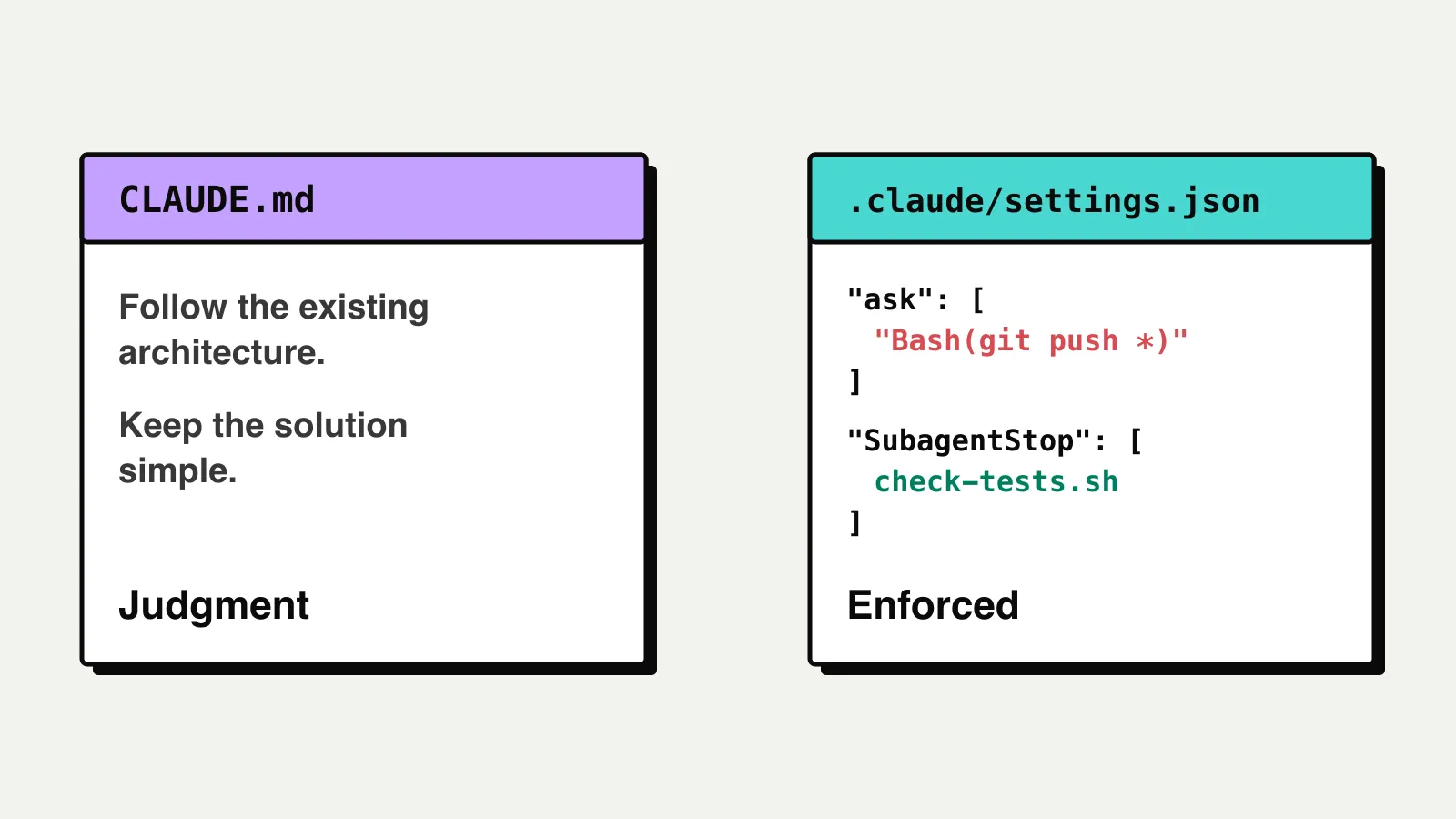
"Follow the existing architecture." "Keep the solution simple." "Prefer small functions." These need judgment. There is no command you can run to check them, and the agent has to weigh them case by case. They belong in the prompt, in CLAUDE.md or in a skill.
"Ask me before pushing." "Don't say the tests pass without a passing test run." These have conditions a program can check: the command starts with git push, the test report is missing or says failed. These can also go into the tooling around the agent, where Claude Code checks them every time instead of the model remembering them.
Where the settings live
Claude Code reads settings from several files and merges them. The three you edit yourself:
~/.claude/settings.json: you, in every project. Not in git..claude/settings.json: everyone working in this project. Commit it..claude/settings.local.json: you, in this project only. Claude Code keeps it out of git.
A team rule like "ask before pushing" goes in .claude/settings.json, so everyone who clones the repository gets it. Personal preferences go in your user or local file. When the same setting appears in more than one file, the more specific one wins: local over project, project over user. Organizations can also push managed settings that override all three.
Permissions: allow, ask, deny
A permission rule names a tool and, optionally, a pattern for what the tool is called with. There are three lists:
allow: runs without asking.ask: Claude Code stops and asks you every time.deny: blocked, the agent gets an error.
When a call matches rules in more than one list, deny wins over ask, and ask wins over allow.
The rule is enforced by Claude Code, not by the model. The model can decide to run git push; Claude Code decides whether the command runs.
Ask before pushing
This is the ask block in my project settings:
{
  "permissions": {
    "ask": [
      "Bash(git push *)",
      "Bash(git reset *)",
      "Bash(git rebase *)",
      "Bash(git clean *)",
      "Bash(git restore *)",
      "Bash(git checkout -- *)",
      "Bash(git config *)",
      "Bash(git add -f *)",
      "Bash(git add --force *)"
    ]
  }
}
The list is the git commands that publish work or throw it away: pushing, rewriting history, discarding uncommitted changes, changing git configuration, force-adding ignored files. Commits are not on the list. A local commit is easy to undo; a push isn't.
When the agent tries to push, Claude Code pauses and shows you the exact command. It runs only if you approve.
Bash(git push *) matches any command that starts with git push. The space before the * matters: Bash(ls *) matches ls -la but not lsof. A trailing * also matches the bare command, so the same rule covers a plain git push with no arguments.
What a Bash rule doesn't match
Bash rules match the text of the command. Bash(git push *) does not match git -C . push origin main, or a push inside a script the agent writes and runs.
The Claude Code permissions docs (opens in a new tab) are explicit about this. For a boundary that holds against everything, use the sandbox, which enforces it at the OS level. For a rule about how the agent normally works, like asking before pushing, a permission rule catches the commands the agent actually runs day to day. Know which one you need.
Write the rule down for the agent too
A setting stops the action. It doesn't tell the agent what to do next. When a command is blocked or denied, the agent treats it like any other obstacle and looks for another way to finish the task. As the previous section showed, other ways exist.
So next to every rule in settings.json, I write the same rule in words, in CLAUDE.md or in the skill that does the work:
## Git
- Pushing requires the user's approval. When the work is ready,
  say so and wait.
- If a command is blocked or denied, stop and ask. Don't look for
  another way to run it.
The setting catches the action. The instruction tells the agent that the block is the intended outcome, not a problem to solve.
Hooks: your script runs at a fixed point
A hook is a command Claude Code runs when something happens in the session. Some events you can hook into:
PreToolUse: before a tool call. The hook can block it, which is useful for rules a permission pattern can't express.StopandSubagentStop: when the main agent or a subagent is about to finish. The hook can send it back to work.
There are many more, for example when you submit a prompt, before the context is compacted, and when a session starts or ends. The Claude Code hooks reference (opens in a new tab) lists them all, with the input each one receives and whether it can block.
The hook gets the event as JSON on stdin and answers with its exit code. Exit 0 lets things proceed. Exit 2 blocks, and whatever the script wrote to stderr becomes the reason. Any other exit code, including 1, is a non-blocking error and the action goes ahead.
Don't let the validator pass without a test report
A Stop hook fires every time the main agent ends its turn, and it has no matcher. For a check that belongs to one role, use SubagentStop. It runs when a subagent finishes, and its matcher is the agent's name. This one runs only when the code-validator agent finishes:
{
  "hooks": {
    "SubagentStop": [
      {
        "matcher": "code-validator",
        "hooks": [
          {
            "type": "command",
            "command": "\"$CLAUDE_PROJECT_DIR\"/.claude/hooks/check-tests.sh"
          }
        ]
      }
    ]
  }
}
$CLAUDE_PROJECT_DIR is the project root, so the path works no matter which directory the agent has moved into.
The validator runs the tests and returns PASS or FAIL on the first line of its reply. The hook reads that reply from last_assistant_message in its input. A FAIL goes through: failing tests are what the validator should report. For a PASS, the script checks the evidence instead of rerunning the suite: a test report exists, it says the tests passed, and it is newer than the latest code change. If not, it writes the reason to stderr and exits 2.
When that happens, the validator can't stop. It gets the message as the reason to continue, runs the tests, and returns a verdict that matches the report. This separates "the validator says the tests pass" from "there is a report that says the tests pass".
To keep it from looping, the hook's input also has a stop_hook_active field. It is true when the agent is already continuing because of a stop hook, so a script can use it to allow one retry instead of blocking forever.
Check that it works
After adding a rule, trigger it once. A guardrail you haven't seen block anything may not be blocking anything.
- Run
/permissionsto see every rule and which file it came from./hooksdoes the same for hooks. - Ask the agent to push to a branch and confirm the approval prompt appears.
- Change some code, then tell
code-validatorto returnPASSwithout running the tests. The hook should send it back.
A hook fails open in two common ways: it exits 1 instead of 2, or its script path is wrong. In both cases Claude Code shows a non-blocking error and the action goes through.
Where to start
Start with one ask rule for git push. That is a few lines in .claude/settings.json, and the whole team gets it on the next pull. Add a SubagentStop hook when there is a condition you want checked every time before an agent says its work is done.
The prompt still does most of the work. It is where the judgment lives: architecture, simplicity, what good looks like in this codebase. The settings file is for the few rules where you can check the condition, and where you want the answer to be the same every time.
In my graph engineering post I ended with "for steps that must never be skipped, add enforcement later with hooks". This is what that looks like.