Graph Engineering for Coding Agents: A Simple First Workflow
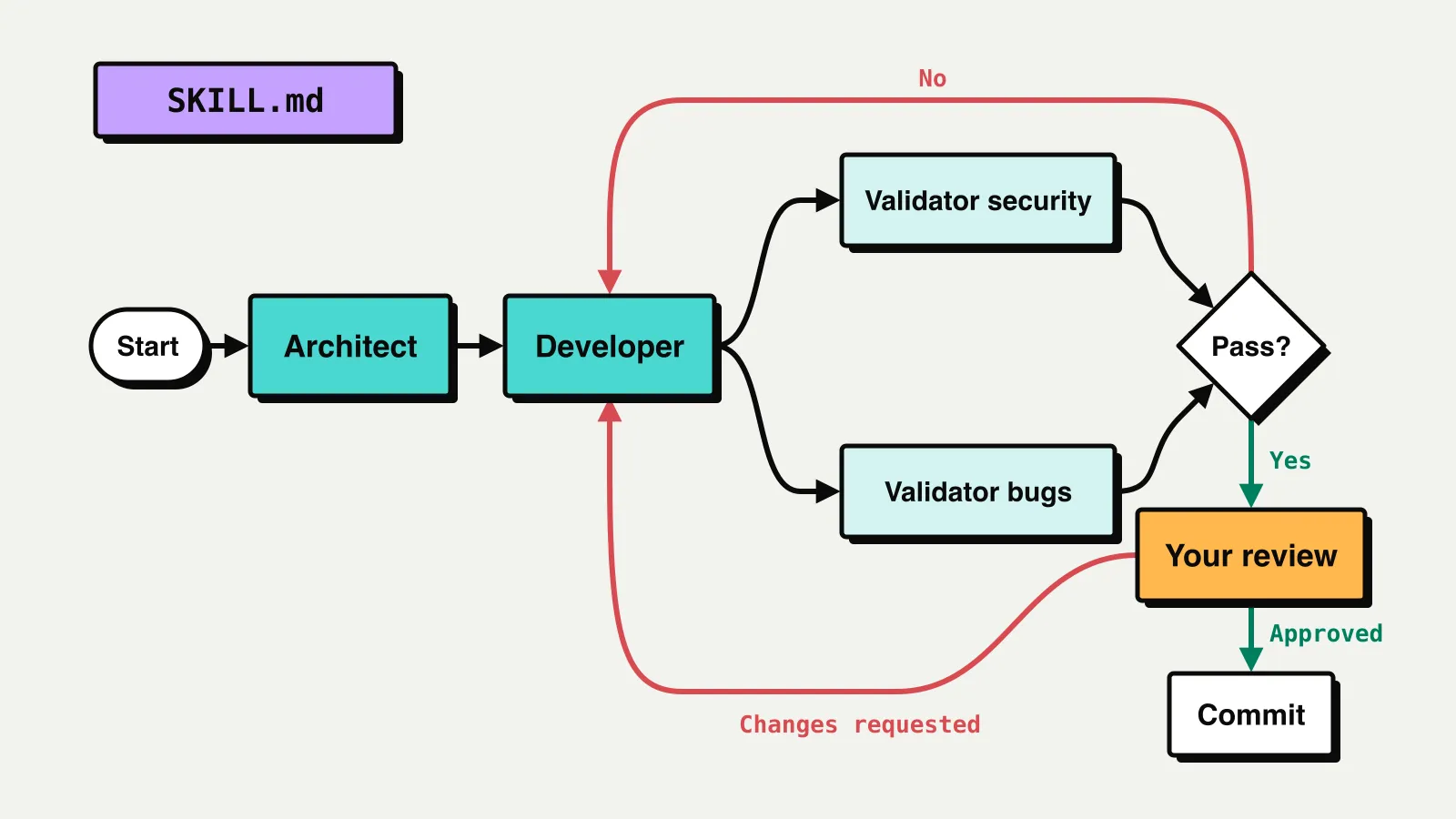
Graph engineering for coding agents sounds complicated. Your first workflow can fit in one SKILL.md file.
If you already know how you want your agent to work, write that process into a skill. Maybe you want a plan before implementation, validation after the changes, and your approval before committing. The skill gives the agent a reusable workflow to follow, without explaining the same process in every task.
I use workflows like this for software development, DevOps, monitoring and code review. This post builds one simple example from start to finish in Claude Code: a development flow with an architect, a developer, two validators and your own review before the commit. Three agent files and one skill.
Steps, handlers and decisions
A workflow graph is three things written down:
- Steps: the work, in the order it flows. Each step produces something the next one receives: a plan, code changes, findings.
- Handlers: who or what does each step. An agent, a script, a validator, or you.
- Decisions: what determines the next step. A PASS goes forward, a FAIL goes back, your approval lets the work through.
Most of the value is in the third part. A long prompt usually describes the happy path. The graph also says where the work goes when a check fails or when you ask for changes.
1. Draw the flow and turn it into Mermaid
Start on a whiteboard. Draw the boxes and the arrows, take a photo, and ask your coding agent to turn it into Mermaid. Then check that the diagram says what you meant.
The example flow in Mermaid:
flowchart
    S([Start]) --> A[Architect]
    A --> D[Developer]
    D --> B[Validator bugs]
    D --> V[Validator security]
    V --> Q{Pass?}
    B --> Q{Pass?}
    Q -->|No| D
    Q -->|Yes| U[Your review]
    U -->|Changes requested| D
    U -->|Approved| C[Commit]
The architect plans, the developer implements, and two validators check the change in parallel, one for bugs and one for security. If either fails, the work goes back to the developer. If both pass, you review it. You either approve the commit or send it back with changes.
2. Make an agent for each role
Every box that does real work becomes an agent. In a Claude Code project, agents live in .claude/agents/ and skills in .claude/skills/:
There are two validator boxes in the diagram but only one validator.md. It is the same agent run twice with a different focus. One agent can be more than one node.
An agent file has frontmatter and instructions. The frontmatter says what the agent is for and what it may use; the body says how it works and what it must return.
The architect plans and does not write code:
---
name: architect
description: Designs how to implement a task in this codebase: which files change, in what order, and how the result is tested. Use before implementation starts.
disallowedTools: Edit, Write
---

You are the architect. You design the change; you do not write code.

## Process

1. Read the task and the code it touches.
2. Follow the patterns already in the codebase.
3. Write a short plan: the files to change, what changes in each,
   the tests to add, and anything the developer must not touch.

## Output

Return the plan.
The developer implements the plan, and later fixes whatever comes back from the validators or from you:
---
name: developer
description: Implements a task from the architect's plan, with tests. Use for implementation once a plan exists, and for fixing findings from the validator or the user's review.
---

You are the developer. You implement the plan you are given, with tests.

## Process

1. Read the plan and the files it names.
2. Implement the change and its tests, following the existing patterns.
3. Run the tests and the type-check, and fix what fails.
4. When you are given findings or review comments, fix exactly those.

## Output

`DONE` and the files you changed, one line each.
The validator is where the decisions come from, so it is worth showing in full:
---
name: validator
description: Validates a code change with one focus, bugs or security, and returns PASS or FAIL with evidence. Use after implementation, before review or commit.
disallowedTools: Edit, Write
---

You are a validator. You check the change; you never fix it. A validator
that fixes what it finds is no longer a check.

The prompt names your focus: `bugs` or `security`. Check only that.

## Process

1. Read the plan and the change: `git diff` against the base branch.
2. Run the tests.
3. Look for problems in your focus.
   - bugs: logic errors, missed edge cases, failing tests.
   - security: injection, leaked secrets, missing authorization,
     unsafe handling of input.
4. Report a finding only with evidence: file, line and what goes wrong.

## Output

The first line is the verdict and nothing else:

- `PASS`
- `FAIL`, followed by each finding: file and line, the problem, the evidence.
Two parts of an agent file matter most for the graph.
The description says when to use the agent. The orchestrator reads it to pick the right one.
The output is the agent's contract with the rest of the graph. The Pass? diamond in the diagram is the first word of the validator's reply. When the output is a fixed word, the orchestrator does not have to interpret a paragraph of prose to decide where to go next.
Together the outputs are the handoffs that move through the graph: the architect's plan goes to the developer, the developer's changes go to the validators, and the validators' findings go back to the developer.
Removing Edit and Write from the architect and the validator keeps them in their role. It does not stop writes through Bash, so it is a role boundary, not access control.
3. Write the skill that runs the flow
The agents are the nodes. The skill is the graph: it says which agent runs when and where the work goes after each result. The main agent in your session reads the skill and becomes the orchestrator.
---
name: development-flow
description: Runs a development task through architect, developer, two validators and the user's review before committing. Use when implementing a feature or a non-trivial fix. Not for typos, one-line changes or questions about the code.
---

You coordinate the flow. The agents do the work; you pass results
between them and choose the next step from their output.

## Flow

~~~mermaid
flowchart
    S([Start]) --> A[Architect]
    A --> D[Developer]
    D --> B[Validator bugs]
    D --> V[Validator security]
    V --> Q{Pass?}
    B --> Q{Pass?}
    Q -->|No| D
    Q -->|Yes| U[Your review]
    U -->|Changes requested| D
    U -->|Approved| C[Commit]
~~~

## Steps

1. **Architect.** Invoke `architect` with the task. Pass its plan to
   every agent after it.
2. **Developer.** Invoke `developer` with the task and the plan.
3. **Validators.** Invoke `validator` twice in parallel, in a single
   message: once with `focus: bugs`, once with `focus: security`.
4. **Pass?** If both replies start with `PASS`, go to step 5. If either
   starts with `FAIL`, send its findings to `developer`, then run step 3
   again with both validators.
5. **Your review.** Stop and show the user what changed and both
   validator results. Ask them to approve or request changes.
   - Changes requested: send the comments to `developer`, then
     continue from step 3.
   - Approved: go to step 6.
6. **Commit.** Commit the change with a message that describes it.
   Do not push.

## When things go wrong

After two failed rounds on the same problem, stop and show the user
the findings: retry, change the approach, or stop.

## Done

Both validators returned `PASS` on the final change, the user approved
it, and it is committed.
Mermaid makes the design visible; it doesn't execute it. The diagram gives you and the orchestrator the whole shape at once. The steps are what the orchestrator actually follows, so each one says what to do at that node and ends by saying where to go next.
A few choices in this file are deliberate:
- The description says when not to use it. Running an architect and two validators on a typo is cost without benefit.
- The parallel step says "in a single message". Without it, nothing tells the orchestrator that the two validators are independent of each other, and they may run one after the other.
- Your review is a step like any other. The orchestrator stops, asks, and routes your answer the same way it routes a validator's verdict.
- The retry limit is not in the diagram. Some decisions are easier to write than to draw. Without a limit, a FAIL loop can run until you notice.
- Done is written down. Otherwise the agent decides on its own when to stop.
You can start the flow with /development-flow and the task, or let Claude pick it from the description when you ask for a feature.
Why a skill and not CLAUDE.md
Workflows like this often live in CLAUDE.md or AGENTS.md: "after implementing, run the tests, then review, then fix the findings". That text loads into every session, including the ones about something else entirely.
It also loads into every subagent. The architect, the developer and both validators each start with CLAUDE.md in their context, so each of them carries a description of the whole flow. None of them needs it. The validator should check the change, not read about when to ask the user for a review. The text costs context in every agent, and it gives each of them instructions that belong to someone else.
A skill puts the flow only where it is needed. Its description is always available to the main agent, and it gives the orchestrator the signal to pick the skill. The full instructions load into the orchestrator's context when the skill is used. The subagents still get CLAUDE.md, but now it holds project facts and conventions, not the flow. Each one works from its own agent file and the task it is given. Every role sees its own part of the graph, and only the orchestrator sees all of it.
The workflow also gets its own file you can review and change like code.
If your CLAUDE.md contains a specific workflow, consider moving the steps into a skill.
Run it on a real task
Pick a real task and run the flow. Then check three things:
- Was the right skill selected?
- Were the steps followed?
- Did the failures go where you intended?
The answers tell you what to change: the description if the wrong skill was picked, the step text if a step was skipped, the edges if a FAIL went somewhere unexpected.
A skill describes the intended flow, and a model can still skip a step. For steps that must never be skipped, add enforcement later with hooks or a workflow runner. Start with the skill and see where it actually breaks.
Not everything needs a graph
A short task can stay a short task. The structure earns its place when the work branches on results, has parts that can run in parallel, needs different roles, or has something that must pass before the work continues.
The useful result is a process you can inspect and change: who owns each step, what passes to the next one, and where unfinished work goes back.
Pick one recurring workflow, draw it, and turn it into a skill. One workflow is enough to start.