How I Use Claude Code Cross-Session Messaging Across Projects
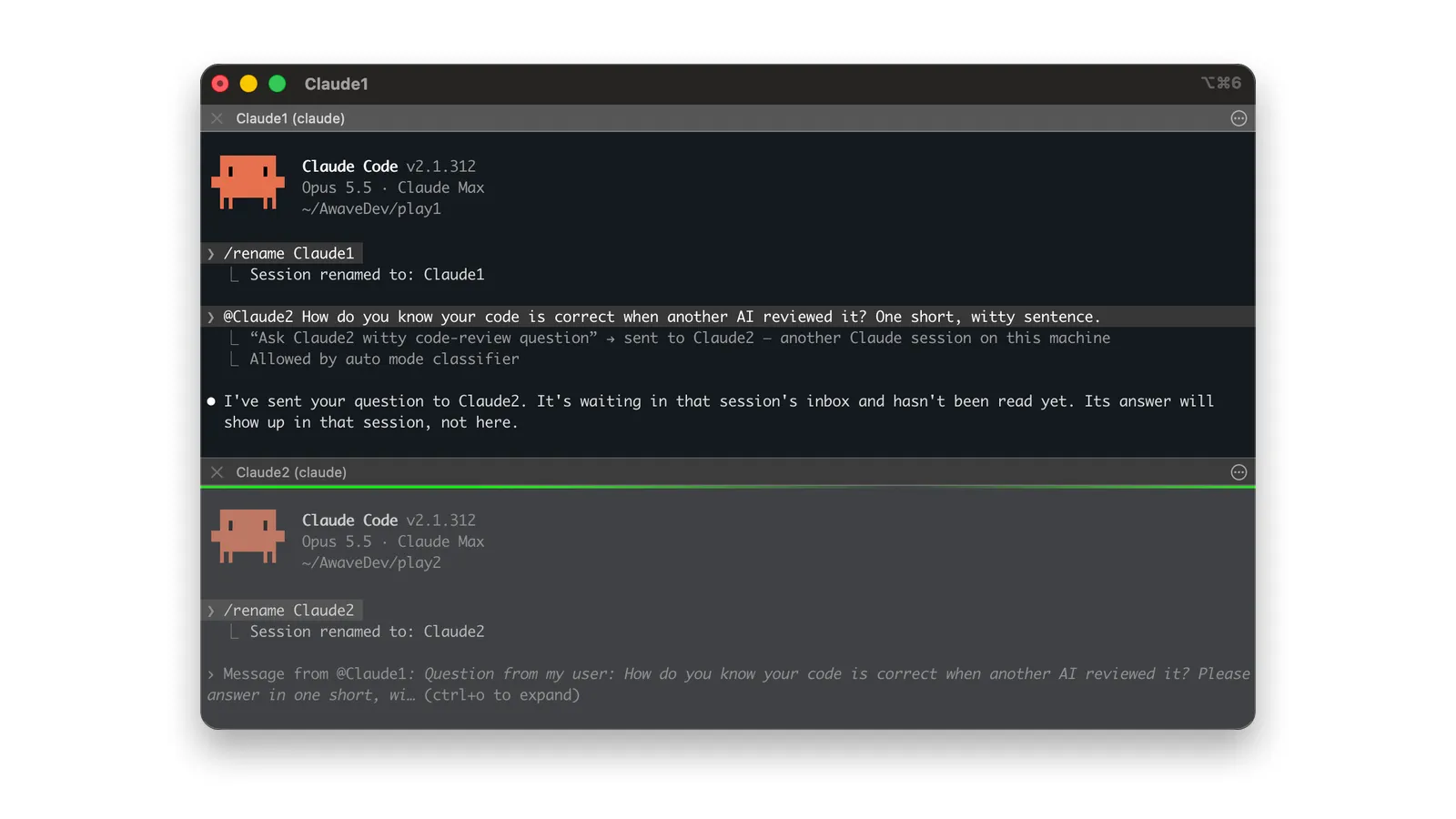
You have two Claude Code sessions open in different terminals. One finds something the other needs to know. You can copy the output across, explain what happened, and carry the answer back. Or you can ask the session that found it to send the message.
For example, I can ask a development session to run a retrospective and send the report:
Run retro and send retrospective to aw-agents-main.
The sessions are started independently, each with its own repository and conversation. Neither needs to have launched the other as a subagent.
I use this to connect development sessions with the session maintaining my shared agent harness: the instructions, agents, skills, hooks, and scripts in my agents repository, which I package as a Claude Code plugin marketplace. Project sessions collect evidence from using the harness and send it to the maintenance session. That is one application of cross-session messaging; the same basic exchange can carry a question, findings, or a request for work.
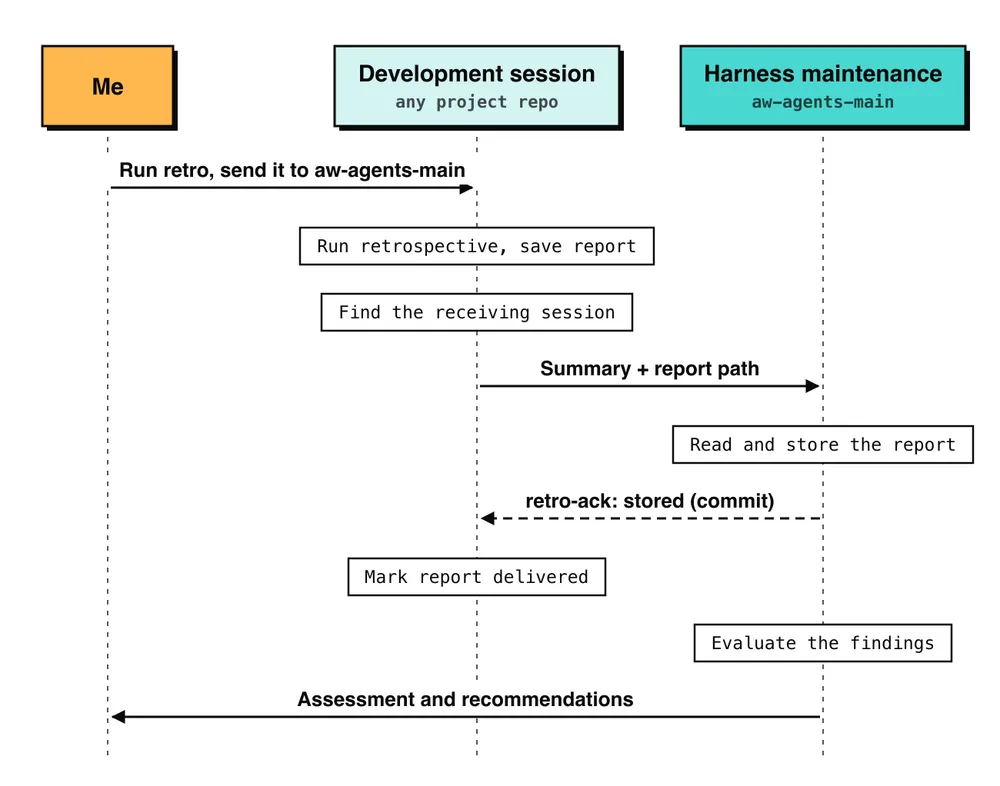
In practice, I pay attention to three things: what the sender provides, how the receiver handles the request, and how I confirm that the requested action happened.
1. Give the sender a clear recipient and enough context to pass on
I give sessions names that identify their responsibility. My harness-maintenance session is aw-agents-main.
To name a session, enter this in its own Claude Code terminal:
/rename aw-agents-main
Use /list-agents to see which sessions are reachable. Claude uses ListAgents and SendMessage internally when you ask it to contact another session. You can also identify the recipient with an @ mention in your prompt, as in the screenshot at the top: two throwaway sessions renamed Claude1 and Claude2, and a question sent with @Claude2. The Claude Code messaging documentation (opens in a new tab) covers discovery and availability.
In a one-off exchange, I name the recipient in my request. For recurring retrospectives, I use a skill that creates the report and reads the destination from the project's configuration:
retro:
  target_session: aw-agents-main
The skill checks that the session is listed. If it finds more than one with the same name, it asks me to choose. This configuration and recipient check are part of my own workflow, not Claude Code features.
The sender also needs to turn its working context into a message the receiver can use. Here is an excerpt from the first message, with omissions and shortened project identifiers and paths:
Please read a harness retrospective of the awave-agents plugins
(aw-review 0.9.0, aw-dev 0.4.0) from the core-service session.
File: …/core-service/.retro/harness/20261029-082308/retro.json
...
- inferred: true where a cause or reading is not stated by the evidence;
- fix-proposal: a suggestion only, yours to decide.
... Please treat it as read-only.
The full message identified the report, described its contents, and explained how to interpret the observations. The actual file reference was an absolute path, so the receiver could locate it from another repository.
I would use the same pattern for other tasks: say what you want done, include the evidence or point to it, distinguish observations from suggestions, and specify the response you expect. Include versions, command output, or run identifiers when they help the receiver interpret the request.
Cross-session messages carry text. They do not transfer the sender's conversation history or attach referenced files. The receiver opens accessible files with its own tools and permissions. See message delivery (opens in a new tab).
In these exchanges, the sessions ran on the same machine. Shared file access let the message point to a report instead of reproducing all its evidence. If the receiver cannot access a referenced path, you need another way to provide that material.
2. Make the receiver's response to the message explicit
When a message is accepted, an active session reads it between tool calls; an idle session starts a new turn to process it. Incoming controls can hold or refuse delivery. The receiving session's permission rules still apply, and another session cannot approve actions for you. These are Claude Code's receiving rules (opens in a new tab).
What the session does with the request then depends on the task and its own instructions. For a one-off question, the message can describe the whole job: inspect this result, answer this question, and send the answer back. That last part matters. In the screenshot, Claude1 says it plainly: the answer "will show up in that session, not here."
For recurring retrospective reports, I wanted consistent handling. I put this instruction in the receiving repository's CLAUDE.md:
When a message arrives whose first line starts with `harness-retro`,
or the user asks you to take in a retro file,
read docs/retro-intake.md and follow it.
Reports sent after the first exchange use that prefix. The intake procedure tells the session to store the report, acknowledge storage, evaluate the findings, and present recommendations to me. I defined those steps for this particular message type.
Keeping the procedure in the repository makes it available when the conversation context changes. The maintenance session continued receiving reports across several context compactions.
The receiving agent must still assess the evidence. My procedure asks it to check each claim against the code and determine whether the evidence supports the proposed cause. A clearly written message can still contain a mistaken diagnosis, and the maintenance session has rejected findings after checking them.
Its allowed next steps are also clear: it can store and assess the report, but corrections wait for my decision. For another task, it might be allowed to answer directly or conduct a read-only investigation. The request and the receiver's instructions should make those boundaries clear.
3. Define what counts as a completed exchange
For a question, the answer may be all the confirmation you need. For my retrospectives, I need to know that the report has been stored where it will be evaluated later.
That is why I added an acknowledgement to the workflow. After storing and committing the first retrospective, the receiving session sent this reply, shown here with the project name shortened:
retro-ack retro-20261029-082308 stored retros/core-service/retro-20261029-082308.json (9940afc)
The reply also contained the command for updating the sender's delivery record. Only after processing that acknowledgement does the sending session mark its local file as delivered.
The sender's instruction captures the reason:
a sent message is not a received one, and silence is not an acknowledgement.
The path and commit identify the stored report. The acknowledgement confirms storage; evaluation and any resulting corrections are tracked separately.
This is a convention I built on top of messaging. A simple request and answer does not need a retrospective file, a commit, or this acknowledgement format.
For work that needs to survive an interrupted exchange, I also need a plan for an unavailable recipient. My skill writes the report locally before sending it. If it cannot find the receiving session, it leaves the file pending and tells me to open that session and run the send command later. The storage script is designed to handle a resend without replacing the evaluation already recorded for the report.
I haven't seen that path run for real yet. Successful delivery between running sessions does not by itself verify the recovery behavior.
Less manual coordination across eight projects
As of November 2026, eight projects feed observations into the session that maintains my harness. Each project has its own development sessions and context. Cross-session messaging lets them pass relevant findings to the harness session without me moving the information between projects.
Once I ask a development session to run retro and send it, the sessions handle report preparation, delivery, and acknowledgement as part of the workflow. I no longer need to copy the findings into another terminal or explain the same issue again.
That takes a recurring coordination task off my plate. I can focus on the harness session, review the collected observations and the agent's assessment, and decide what needs to change.